
A practical guide for homeowners
Home Renovation Budget Spreadsheet
Plan your renovation budget, compare quotes, track purchases and payments, and keep the project schedule connected in one clear spreadsheet system.
A useful renovation budget template gives you more than a total. It helps you follow the choices, commitments and payments behind that number, from the first quote through to completion.
Explore the Home Renovation PlannerExcel + Google Sheets · No macros · No subscription
One connected workflow
What should a renovation budget spreadsheet track?
Budget → Quotes → Purchases → Payments → Changes → Schedule.
These are different views of the same project. Your starting budget describes what you intend to do. Quotes help you weigh the options. Purchases record what you order, while payments show what you have actually paid. Changes capture revised work, and the schedule keeps timing alongside the financial picture.
RATIONORA Home Renovation Planner brings those working parts together. Use it for one renovation project per workbook, keeping the scope, costs and decisions in a consistent place instead of rebuilding the story from separate lists.
Read the whole picture
Budget vs actual renovation costs
Your original budget is the starting point, not a record of everything already spent. As quotes arrive and plans develop, current estimates help you understand what the work is likely to cost. Projected final cost gives you a view of where the overall project is heading.
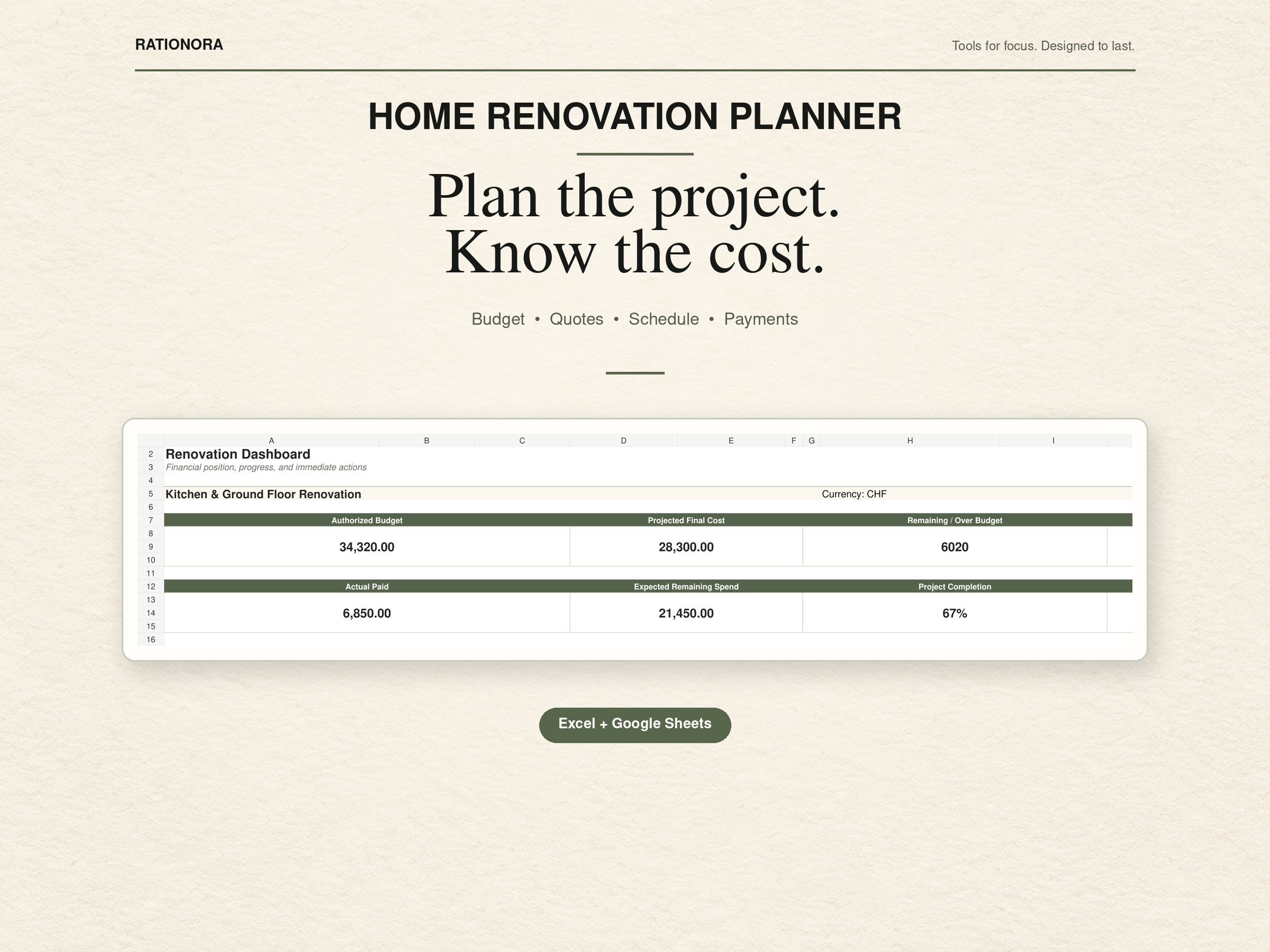
Actual spending answers a different question: what has been paid so far? The Dashboard shows Authorized Budget, Projected Final Cost, Remaining / Over Budget, Actual Paid and Expected Remaining Spend. Reviewing these together helps you distinguish available budget from payments still ahead.
A low amount paid does not necessarily mean the project is comfortably within budget. You may already have committed to purchases or work that will be paid later.
Before you commit
Compare contractor and supplier quotes
A quote is most useful when you can consider it alongside the work it covers and the budget available. Keep contractor and supplier quotes with your project records so you can revisit the options before committing to an order.
Look beyond the headline amount: check which work or items are included, what remains undecided and how the proposal fits the scope. The Quotes and Contacts sections give those conversations a place within the renovation planner spreadsheet, rather than leaving them disconnected from the cost picture.
Commitments and cash
Track purchases and renovation payments separately
Ordering a fixture and paying for it are not always the same event. A purchase records the order or commitment; a payment records money paid. Keeping them separate makes the difference between projected cost and actual spending easier to understand.
Use Purchases for your orders and Payments for the amounts paid, including deposits and later payments. The system also supports refund records. Keeping refunds visible helps preserve the payment history instead of making a returned purchase disappear from your records.
When plans change
Keep renovation changes from breaking the budget
A different material, added task or revised scope can change what you expect to spend. Use Change Orders to keep those revisions together and Decisions to record the choices behind the work.
Review a proposed change alongside the budget and schedule before treating it as part of the plan. A renovation cost tracker is more useful when the reason for a revised figure is easy to find. These sections support your own record keeping; they do not make project decisions for you.
Timing belongs in the plan
Connect the budget to your renovation schedule
The rolling 26-week Schedule keeps project timing in the same system as the budget. Use it to review the sequence of work alongside the purchases and decisions that still need attention.
When timing changes, revisit the relevant records as well as the dates. A delayed order or revised task can affect when you need to make a decision or arrange a payment. Keeping the schedule nearby makes those conversations easier to prepare for.
Work in a familiar format
Excel or Google Sheets?
Both the Microsoft Excel workbook and native Google Sheets version are included. Choose the edition that fits how you already manage your household records: an Excel renovation planner or a Google Sheets renovation planner.
The Excel and Google Sheets editions follow the same core system but are separate working versions. They do not automatically sync with each other.
Keep one as your main working copy so you know where the current project records live. No macros or subscription are required.
Inside the system
What is included in the RATIONORA Home Renovation Planner?
The package includes the Excel workbook, native Google Sheets version, Quick Start documentation and an A4 / US Letter printable companion. The 12 sections carry the project from setup to completion, with a Dashboard for reviewing the wider picture.
Start with the guidance and settings, then build out the records you need as the project develops. You do not need to turn every planning conversation into a separate document.
Explore the product and package details →- Start Here
- Dashboard
- Scope & Budget
- Quotes
- Contacts
- Schedule
- Purchases
- Payments
- Change Orders
- Decisions
- Completion Record
- Settings
Made for homeowners
Who is this renovation spreadsheet for?
This home renovation spreadsheet is for homeowners managing renovation, remodeling or substantial home-improvement projects. It suits someone who wants a clear structure for project costs, choices and progress without adopting specialist construction software.
If you are looking for a remodel budget spreadsheet that keeps more than estimated costs together, the connected records help you follow the work through purchases, payments and completion. It is not professional contractor or accounting software, and it does not generate market construction estimates.
For item details and warranties after the work, the Home Inventory Spreadsheet offers a separate household record system.
Your next step
Keep the renovation together
Budgets, quotes, purchases and decisions become difficult to manage when they live in different places. RATIONORA Home Renovation Planner brings the working parts of a renovation into one connected system.
Explore the product page to review the system and purchase details before choosing your working format.
View the Home Renovation PlannerExcel + Google Sheets · No macros · No subscription