
Current Week
Bring Overdue, Today and This Week together. See what already needs attention and what falls before the end of the current week.
A recurring routine for your home
Organize recurring household cleaning tasks by room and frequency, see what needs attention now, and keep track of what was done without rebuilding the schedule every week.
RATIONORA Home Cleaning System is a household cleaning planner for your own home. Start with editable tasks, adjust the routine to your rooms and return to one clear Plan.
Explore the Home Cleaning SystemExcel + Google Sheets · No macros · No subscription
From a list to a routine
A useful cleaning spreadsheet answers a few everyday questions: what needs cleaning now, which room it belongs to, how often it should happen, when it was last completed and what should receive attention next.
Tasks → Rooms → Frequency → Plan → Done On → Next Attention.
That sequence turns a collection of chores into a routine you can revisit. You define the task and its frequency, read the current priorities in Plan, then record completion on Tasks. The next attention date recalculates from the task settings and dates you enter.
Make it your own
Keep recurring jobs in one structured task library instead of recreating separate daily and weekly lists. The system includes starter tasks you can keep, edit or disable, plus room to add your own within the existing slots.
There are up to 200 task slots and 16 room slots. Rename the rooms or areas to suit your household and use the ones you need. These are capacity limits, not a requirement to fill every slot or follow a predefined house layout.
Let the intervals guide you
A static checklist asks you to decide again what belongs on this week’s list. A recurring system uses each task’s frequency and latest completion date to help determine when it needs attention.
Choose the frequency that fits the job, then update Done On after completing it. Weekly means seven days; monthly follows a calendar month. The workbook recalculates dates within the file. It does not send reminders, push notifications or calendar updates.
Your daily starting point
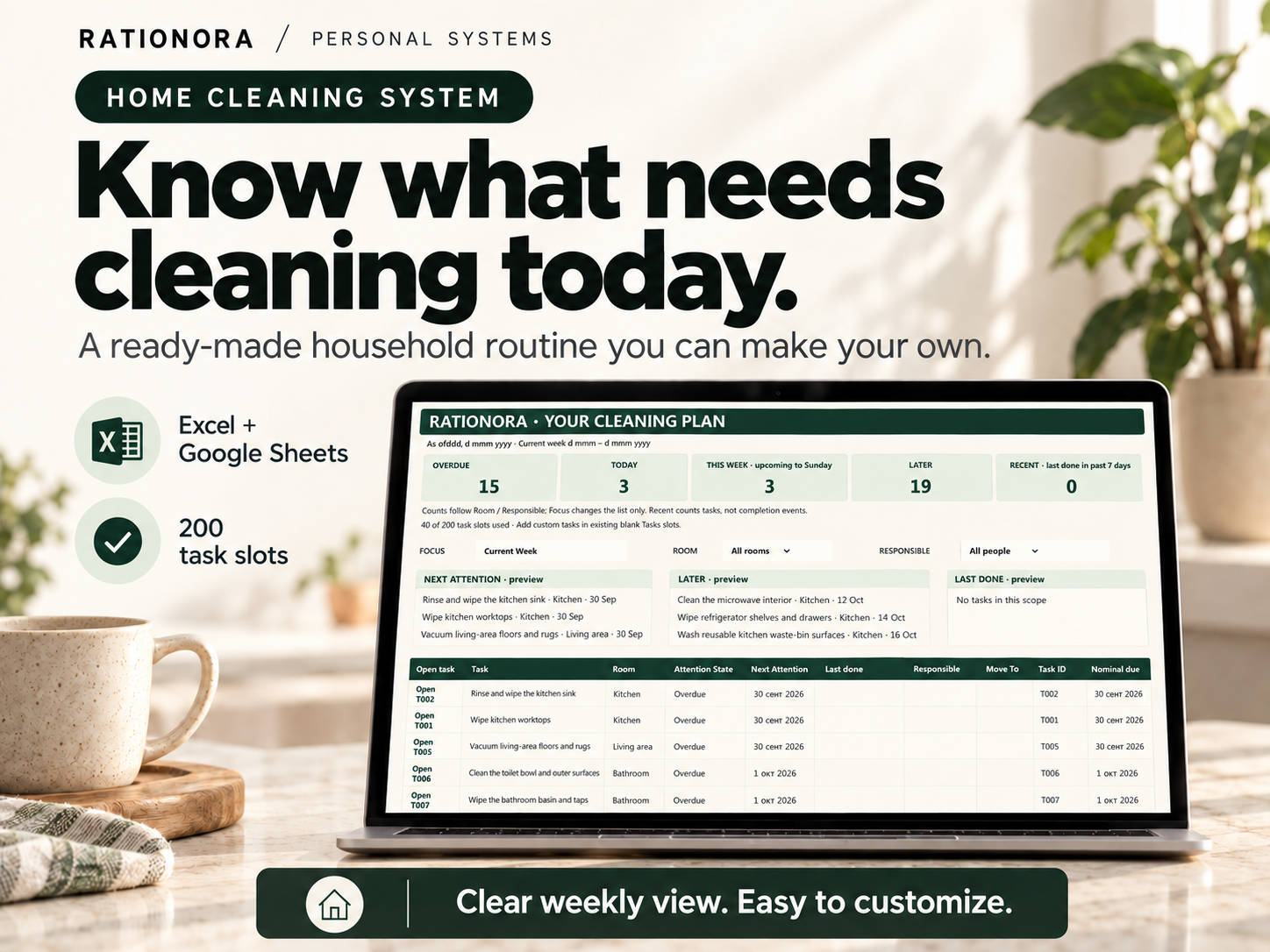
Open Plan to review the routine without changing the underlying task records. Focus, Room and Responsible selectors help you narrow the view when useful.
Bring Overdue, Today and This Week together. See what already needs attention and what falls before the end of the current week.
Use the next attention dates to understand what is coming up. Later separates work beyond the current week from the jobs you are considering now.
See recent work using each task’s latest Done On date. Recent covers the past seven days; it is not a history of every completion.
A routine that can change
Follow a task’s Open link from Plan to its record on Tasks. Enter the actual completion date in Done On. There is no one-click Done button or automatic timestamp: you record when the work happened.
If a task needs a different attention date, enter it in Move To. Moving a task does not mark it complete. When you finish a task with an active move, clear Move To first, then enter Done On. The MOVE ACTIVE Action Advisory reminds you that the move is still set; the file does not clear it automatically.
An interrupted week does not require a new list. Record what happened, intentionally move what needs to wait and return to Plan. Only the latest completion date is stored for each task.
Choose the right kind of list
A traditional weekly checklist can work well for the same small set of chores every week. A recurring system becomes useful when some jobs happen weekly, others monthly, and the dates shift as tasks are completed.
A weekly cleaning schedule spreadsheet can show the immediate workload while keeping less frequent jobs in the wider routine. You can also print a Current Week snapshot from Plan for reference; completion and rescheduling still happen in the digital file.
Keep the list understandable
Room grouping gives a longer task list context. Kitchen, bathroom, bedroom and living areas are useful examples, but you can edit the room names to reflect your home.
Use the Room selector on Plan when you want to focus on one area, then return to All rooms for the wider picture. An optional responsible person helps distinguish household tasks without turning the planner into staff scheduling software.
Use a familiar working format
The dedicated Microsoft Excel workbook suits people who prefer an Excel cleaning schedule. The native Google Sheets edition provides a browser-based working version with normal Google Sheets collaboration options for your household.
The Excel and Google Sheets editions follow the same core system but are separate working versions. They do not automatically sync with each other.
Choose one as your main copy. Use desktop for initial setup, bulk editing and printing, as described in the customer guidance.
Inside the system
Your purchase includes the Excel edition, native Google Sheets edition, Quick Start guide and Google Sheets access guide. The core workbook has three sections:
Start with the supplied routine and adapt it using the customer instructions. This cleaning checklist spreadsheet keeps the task records and current view together, rather than asking you to maintain a second weekly list.
Explore the Home Cleaning SystemExcel + Google Sheets · No macros · No subscription
For everyday household use
Homeowners, renters and households with recurring chores can use the system to keep a digital routine instead of repeatedly writing weekly lists. It is designed for cleaning your own home, not cleaning-company shifts, client appointments or facilities management.
For equipment, repairs and recurring upkeep rather than cleaning, explore the separate Home Maintenance Tracker.
Your next step
Keep recurring household tasks, rooms, frequencies and completion history together so you can focus on what needs attention next.
View the Home Cleaning System